
Website Trust Signals South Africa: How to Build Credibility Online

Website trust signals South Africa refers to the credibility cues that help local customers decide whether a business looks reliable enough to contact or buy from. These signals include clear contact details, professional design, reviews, proof of work, secure browsing, useful content, and transparent policies.
Trust is not created by one badge or one testimonial. It is built through a series of small confirmations across the website. A visitor should feel that the business is real, capable, active, and easy to deal with.
For South African business owners, this matters because many website visitors are comparing several suppliers at the same time. They may not know your business yet. Your website has to reduce doubt before it asks for an enquiry.

Why Website Trust Signals South Africa Matter
A website often creates the first serious impression of a business. If the website looks unfinished, vague, outdated, or difficult to use, visitors may question the quality of the business behind it.
Trust signals are especially important for service businesses, professional firms, ecommerce stores, trades, hospitality businesses, health practices, and local suppliers. In these sectors, people are often making decisions that involve money, time, access to property, personal information, or long-term relationships.
A strong trust signal answers an unspoken question. For example, a real address answers “Is this business genuine?” A case study answers “Have they done this before?” A clear process answers “What happens after I enquire?”
Start With Clear Business Information
The first trust signal is simple: make it obvious who you are, what you do, and where you operate. Many websites hide this information behind vague brand language. That creates friction.
Your website should clearly show:
Business name
Core services
Service area
Phone number or enquiry method
Email address or contact form
Physical address where relevant
Business hours where relevant
For local businesses, service area clarity is important. A customer in Paarl, Cape Town, Stellenbosch, or Johannesburg should quickly understand whether you can help them. If you work nationally, say so clearly.
Use Professional Design Without Overcomplicating the Website
Professional design is a trust signal because it suggests care, order, and attention to detail. This does not mean the website must be expensive or visually complex. It means it should feel consistent, clean, readable, and suitable for the type of business.
Nielsen Norman Group explains that trustworthy web design is influenced by design quality, upfront disclosure, comprehensive content, and connection to the rest of the web. This supports a practical point: credibility comes from both how a website looks and how clearly it explains information. Trustworthy design research gives useful context for why these signals matter.
Good website design should support the message. Fonts should be readable. Navigation should be simple. Colours should suit the brand. Pages should not feel crowded. Buttons and forms should be easy to use on mobile.
Aquawave’s website design service focuses on practical structure, usability, and search readiness, which are all part of building a credible online presence.
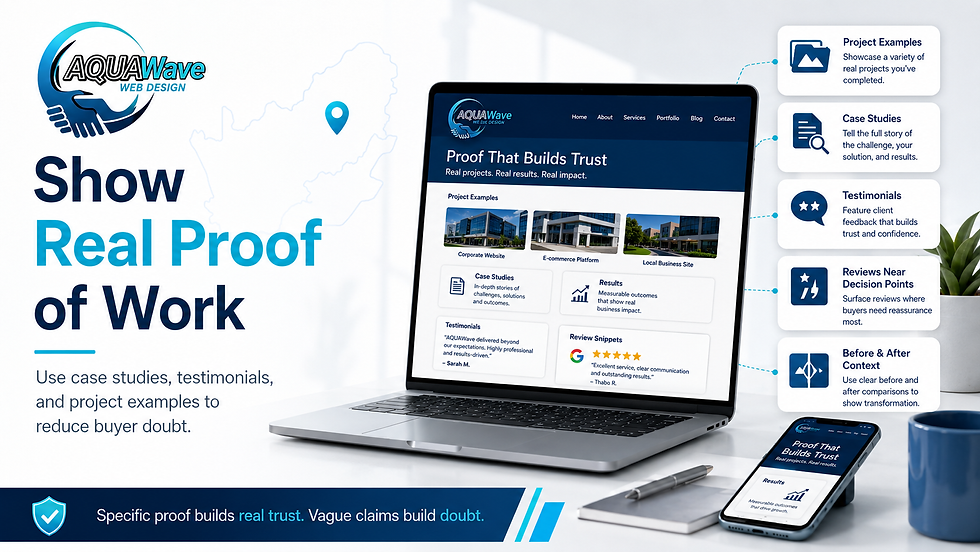
Show Real Proof of Work
Trust grows when visitors can see evidence. Claims such as “professional service” or “excellent quality” are weak unless they are supported by proof.
Useful proof signals include:
Project examples
Case studies
Before-and-after explanations
Client testimonials
Review snippets
Industry experience
Portfolio images
Results where they can be stated honestly
Proof does not always need to be dramatic. A short explanation of a completed project can be enough if it shows the problem, the work done, and the outcome. For service businesses, this helps a visitor imagine what working with you may be like.
Avoid using proof that is too vague. “We helped a client grow” is less useful than “We redesigned a service page so enquiries were easier to submit and the offer was clearer.”
Place Reviews and Testimonials Where Decisions Happen
Reviews should not be hidden on one page only. They should appear near decision points, such as service pages, quote forms, product pages, and contact sections.
A testimonial is most useful when it supports the specific page it appears on. For example, a website design testimonial belongs on a website design page. A delivery review belongs near ecommerce shipping information.
When using testimonials, keep them real and specific. A short, credible review is better than a long, generic quote that sounds edited. Include a name, business name, or context where permission allows.
Make Contact Easy and Reassuring
A visitor should never have to search hard for a way to contact you. Clear contact options reduce doubt and make the business feel more accessible.
Useful contact signals include:
A visible contact page
Click-to-call phone links on mobile
Simple enquiry forms
Clear response expectations
Alternative contact methods where useful
Map or location details where relevant
Forms should ask only for the information needed to respond properly. A long form can work for complex projects, but it should not create unnecessary effort for a basic enquiry.
A small line such as “We usually respond within one business day” can also reduce uncertainty if the business can meet that expectation.
Add Policies and Transparency Where Risk Is Higher
The higher the customer’s risk, the more transparency they need. Ecommerce stores, booking websites, health practices, and businesses collecting personal information should make policies easy to find.
Depending on the business, this may include:
Privacy policy
Returns policy
Shipping policy
Payment information
Cancellation terms
Warranty details
Data handling information
Accessibility statement
Policies should be written clearly. Legal accuracy matters, but customers also need to understand the practical meaning. A policy that is technically present but impossible to understand does not build much trust.
Keep Content Current and Useful
Outdated content weakens credibility. If a website promotes old offers, expired events, broken links, or blog posts that no longer reflect the business, visitors may wonder whether the business is still active.
Current content does not mean publishing constantly. It means keeping important pages accurate. Review service pages, contact details, team information, pricing guidance, product information, and frequently asked questions.
Helpful content also supports trust. When a website answers real customer questions, it shows expertise before the visitor has spoken to the business. For deeper reading,
Aquawave’s article on Google signals that help South African SMEs win enquiries explains how credibility signals can also support visibility and enquiries.
Use Security and Technical Signals
Some trust signals are technical but still visible to users. A secure website connection, fast loading pages, working forms, and error-free navigation all affect confidence.
Important technical basics include:
HTTPS security
Mobile-friendly pages
Fast loading images
Working contact forms
No broken links on key pages
Clear page titles
Accessible navigation
Reliable hosting
If a visitor clicks a button and nothing happens, trust drops. If the site is slow on mobile, trust drops. If the form submits but gives no confirmation, trust drops. Technical reliability is part of credibility.
Build Trust Into the Page Layout
Trust signals work best when they are placed close to the visitor’s decision. Do not leave all proof for the bottom of the website.
A practical service page could include:
A clear service explanation near the top
A short trust statement under the opening text
Relevant project proof after the service description
Testimonials near the call to action
FAQs before the final enquiry form
Contact details near the bottom
This layout helps the visitor move from awareness to confidence. Each section should answer the next natural question.
Do Not Overstate Credibility
Trust signals must be honest. Avoid exaggerated claims, fake urgency, copied testimonials, inflated numbers, or badges that do not mean anything. These may create the opposite effect.
Rather be specific and modest. A clear explanation of real experience is more credible than broad statements such as “industry-leading” or “best in South Africa” without evidence.
Credibility is built through consistency. The website, reviews, Google Business Profile, social profiles, and customer communication should all tell the same story.
Conclusion
Website trust signals South Africa are not decorative extras. They are practical credibility cues that help visitors feel confident enough to take the next step.
Start with the basics: clear business information, professional design, real proof, visible reviews, easy contact options, transparent policies, current content, and reliable technical performance.
A trustworthy website does not need to overwhelm visitors. It needs to answer their questions clearly, reduce uncertainty, and show that the business is real, capable, and ready to help.


Comments